- You cannot patent an app idea in the abstract, only the specific technical method or system your mobile app uses to solve a problem.
- A provisional patent application secures a priority date and “patent pending” status for 12 months, and it does not count against your 20-year patent term.
- The one-year on-sale and disclosure bar under 35 U.S.C. § 102 starts the moment you publicly launch or sell. Miss it and your app generally becomes unpatentable in the United States, unless you act within the limited grace period.
- Total costs to patent an app typically run $10,000 to $20,000+, with patent attorney fees, not USPTO filing fees, driving the price.
- Claim scope determines whether your patent is worth enforcing, so weak claims create a false sense of security, a gap that disciplined claim drafting closes.
*Written by Craige Thompson, Patent Attorney, MBA, Electrical Engineer.* Craige Thompson is a Managing Principal Patent Attorney, electrical engineer, professional engineer, and MBA who helps innovators protect and monetize complex technologies. His experience spans patent prosecution, licensing, prior art searching, due diligence, opinions, reexamination, and litigation across electrical engineering, software, mechanical engineering, medical devices, and energy-efficiency technologies.
An app founder launches a product, and six months later a competitor ships a near-identical clone with no consequences, because the founder never filed for protection and now has no legal recourse. Securing intellectual property rights early is the only reliable way to prevent this outcome. That outcome is common, and it is avoidable. In fiscal year 2023, over 425,000 U.S. patent applications were published, a record high, and software-related inventions, including artificial intelligence tools, make up a large and growing share. When you wait to patent an app, you risk losing rights you never realized you had. This guide walks through every step to patent your app, explains what actually qualifies for protection, and shows where most app inventors forfeit their rights before they ever file.
What You Can Actually Patent in a Mobile App (And What You Cannot)
Most searchers assume they can patent a mobile app idea itself. The law says otherwise, and getting this threshold question wrong wastes thousands of dollars on doomed filings. For a deeper walkthrough, see this founder's guide to patenting mobile apps.
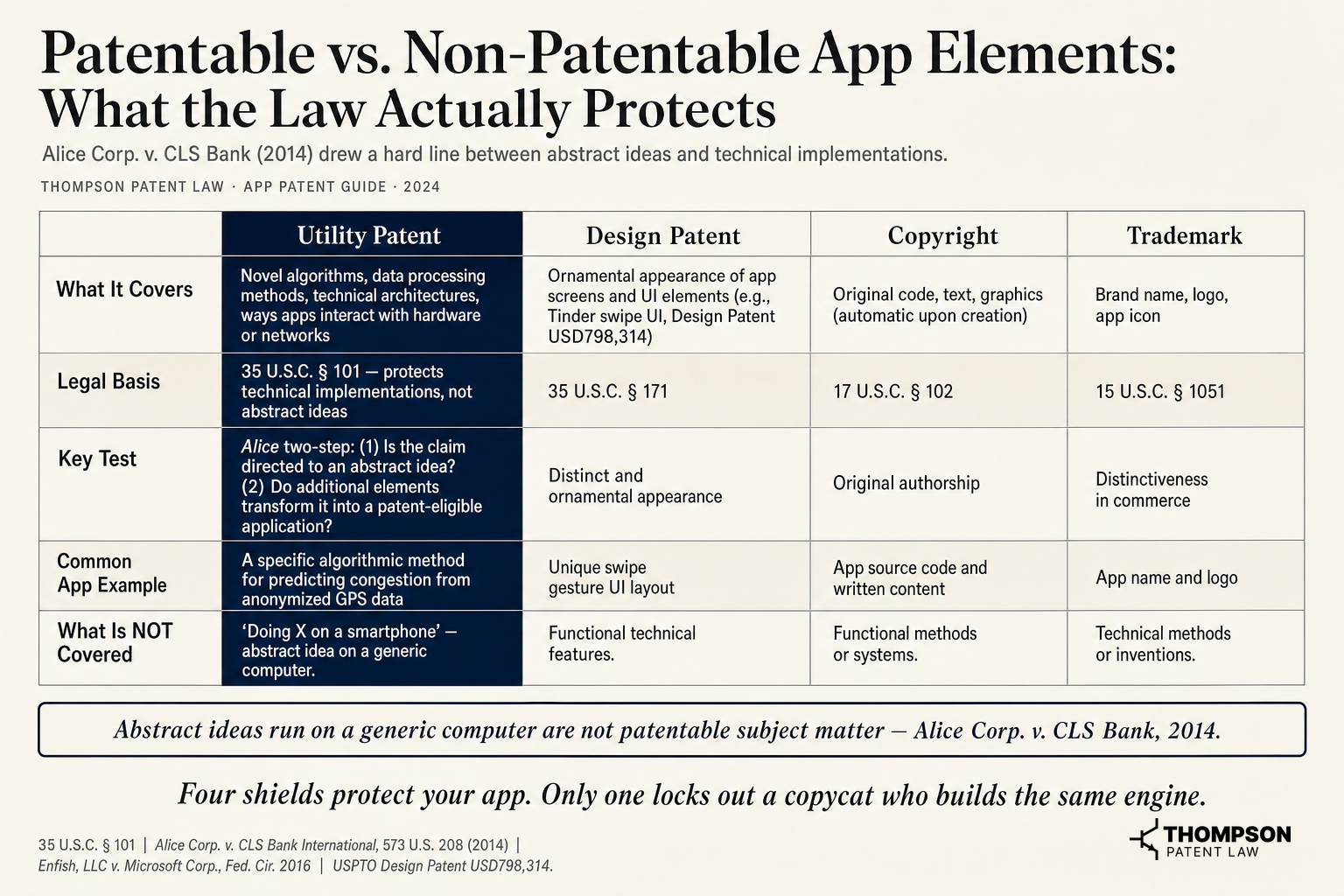 Patentable vs. Non-Patentable App Elements, What the Law Actually Protects, Source: 35 U.S.C. § 101, Alice Corp. v. CLS Bank International, 573 U.S. 208 (2014), Enfish, LLC v. Microsoft Corp., Fed. Cir. 2016, USPTO Patent USD798314S1
The Law Draws a Line Between an Idea and a Technical Implementation
United States patent law under 35 U.S.C. § 101 protects the technical method or apparatus your app uses, not the idea or user experience in the abstract. Patent eligibility hinges on whether your invention goes beyond abstract ideas to deliver a concrete technical result. In Alice Corp. v. CLS Bank International (2014), the Supreme Court created a two-step test, first asking whether a claim is directed to an abstract idea, then whether added elements transform it into something patent-eligible. After Alice, roughly 15% of pending software applications faced § 101 rejections at the 2018 peak, a hurdle that experienced counsel routinely clears with the right claim strategy. Understanding the legal requirements and legal process for patent eligibility is essential before drafting any claims. What you patent is the unique technical solution your app implements, not the problem it solves. Our guide to patents for software covers this distinction in detail.
What Qualifies as a Novel Technical Feature
Utility patents cover new algorithms, novel data processing methods, and inventive ways mobile apps interact with hardware or networks. Design patents separately cover the ornamental appearance of app screens, and Tinder secured Design Patent USD798,314, an official patent with patent number USD798314, for its swipe interface. A navigation app cannot patent "showing traffic," but it may patent a specific algorithmic method for predicting congestion from anonymized GPS data. Identify the technical mechanism behind your app's core function. That is your patent target.
Why an Existing App Does Not Kill Your Patent
Novelty and non-obviousness are distinct tests. Existing patents on a prior app may not cover its underlying methods, and other patents in the same space may similarly leave room for your patent on the same result achieved through a different technical approach. Run a prior art search through Google Patents and published applications before concluding your app is unpatentable.
How to Conduct a Prior Art Search Before You File
Skipping this first step is how inventors burn money on applications that were never going to clear examination.
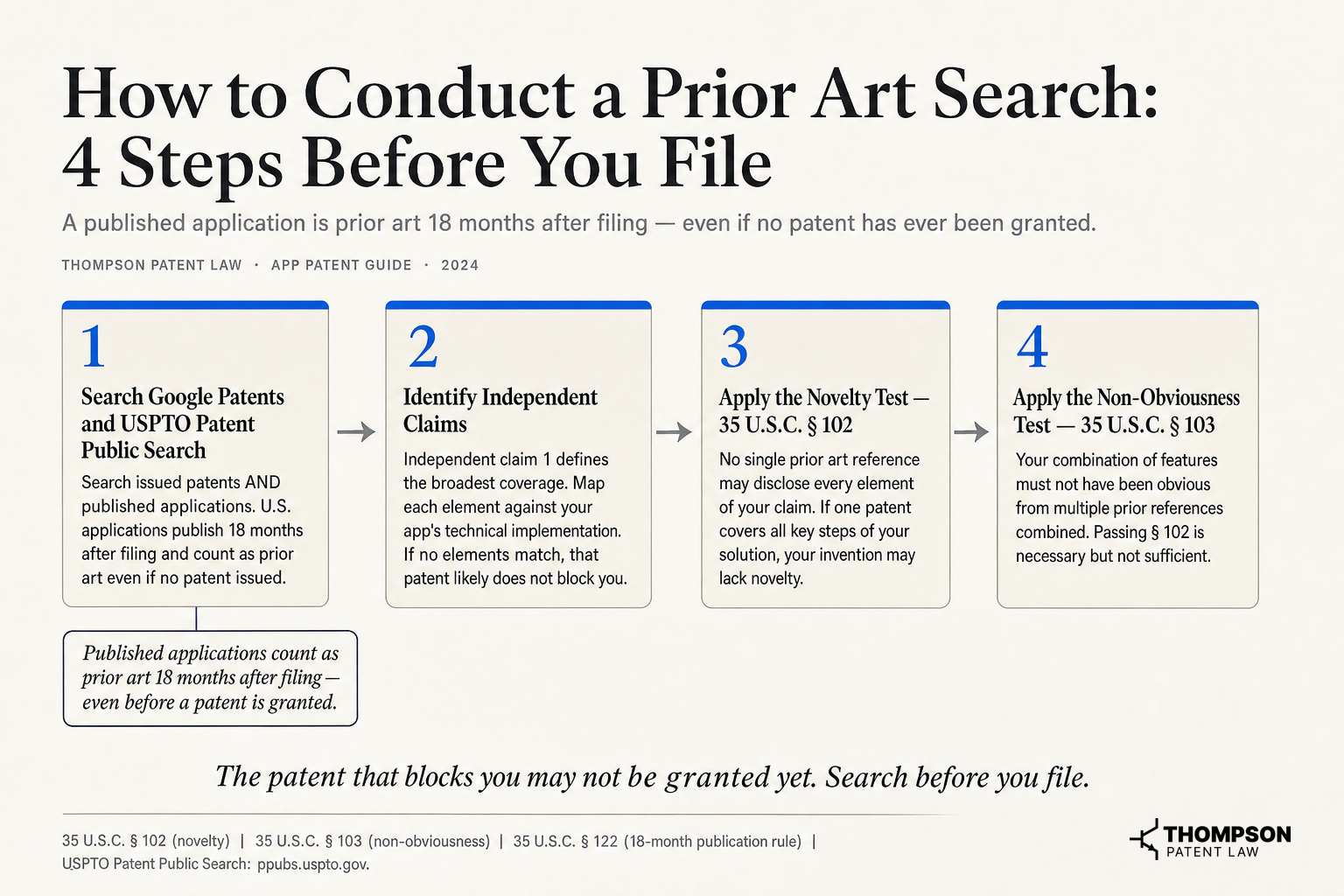 How to Conduct a Prior Art Search: 4 Steps Before You File, Source: 35 U.S.C. § 102, 35 U.S.C. § 103, 35 U.S.C. § 122
Using Google Patents and the USPTO Database
Search by keyword, cooperative patent classifications (CPC) code, and inventor name using Google Patents and the USPTO Patent Public Search. Both issued patents and published applications matter, because U.S. applications publish 18 months after filing and count as prior art even when no patent ever issued. A pending application can block your claims just as effectively as a granted one.
How to Read a Patent to Know Whether It Blocks You
Determining whether a prior patent blocks your app requires reading the entire patent document in its totality, not just claim 1. You must review the specification, the detailed description, the drawings, and all of the claims together as a complete disclosure.
If your app's key steps are mentioned anywhere in that disclosure, even in a single sentence, or if a person of ordinary skill in the art could interpret the disclosure to render those steps obvious, your app may be blocked. The relevant prior art is not limited to issued patents either. A single patent, a single piece of non-patent literature, two pieces of non-patent literature, or combinations of things already known in the field can each independently raise an obviousness bar under § 103.
Reducing your prior art analysis to claim 1 alone will give you a false sense of clearance. A thorough reading of every relevant document, evaluated for what a skilled practitioner would understand it to teach, is the only reliable way to assess whether your invention is novel and non-obvious.
When a Professional Prior Art Search Changes the Outcome
A registered patent attorney or agent applies classification knowledge and Boolean techniques that catch results basic keyword searches miss. Effective patent searching also requires knowing how patent offices classify technology to find the most relevant prior art. Patent examiners almost always find prior art to cite, so a thorough patent search before filing prevents expensive surprises during the examination process and tells you whether your planned claims can survive. Navigating the patent process successfully starts with knowing what prior art stands in your way.
Provisional Patent Application vs. Non-Provisional Patent Application for Apps
This decision shapes your timeline, your budget, and whether you keep your rights at all. For a founder-focused view on moving fast, see patent-first tactics for startups.
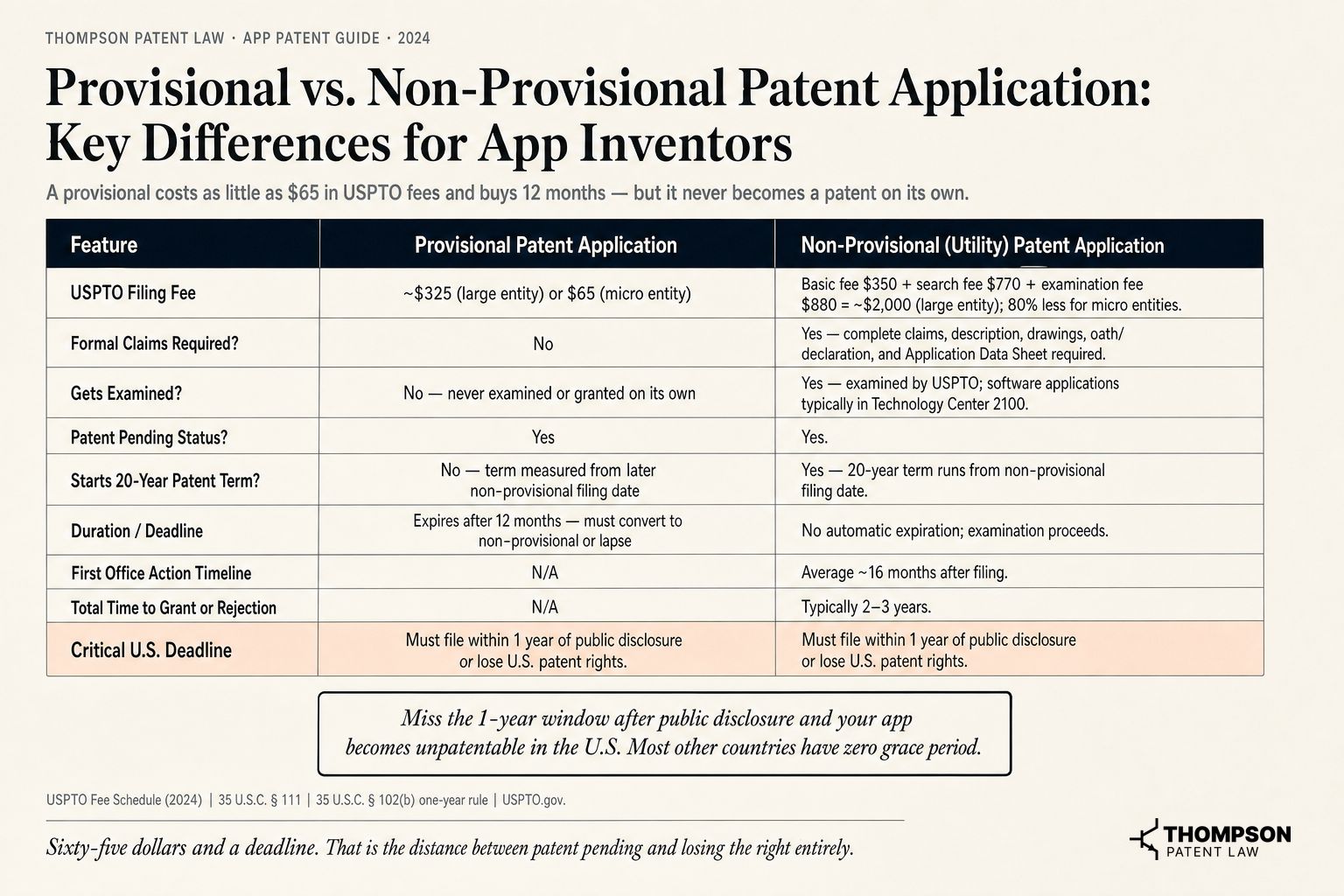 Provisional vs. Non-Provisional Patent Application, Key Differences for App Inventors, Source, USPTO Fee Schedule, 2024, 35 U.S.C. § 111, 35 U.S.C. § 102(b)
What a Provisional Patent Application Does for Your App
A provisional patent application secures a priority filing date for 12 months and grants "patent pending" status while you keep building. This pending status protects your priority while you refine the product. It is never examined and never becomes a full patent on its own. For app inventors still in development, it buys time to refine the product and test market viability. Critically, the provisional period does not count against your 20 years of patent term. File a provisional application to lock in your priority date, then set a hard calendar reminder for the 12-month deadline. The complete provisional patent timeline maps out every critical date.
What a Non-Provisional Patent Application Triggers
The non-provisional patent application, also called a utility patent application, begins the formal examination process with a USPTO patent examiner. It requires complete claims, a detailed description, an abstract, and drawings. For software, the examination process commonly runs two to three years from filing to a final decision for non-accelerated applications. This is the document that can actually become an issued patent.
The One-Year Deadline App Inventors Most Commonly Miss
Under current U.S. patent laws, 35 U.S.C. § 102, under which § 102(a)(1) sets the bar and § 102(b)(1) provides narrow exceptions, public disclosure, public use, or sale of your app more than one year before filing can bar patenting, with only a limited inventor-originated grace period. If you publicly launch, demo, or sell your app and then wait more than 12 months to file, you will generally lose your U.S. patent rights. Many other countries offer a shorter or narrower grace period than the United States, and some offer none at all, so a public disclosure before filing can be fatal internationally. File a provisional patent application before or immediately after any public disclosure, and review when to get a patent to time your filing right.
How to Draft Patent Claims That Actually Protect Your App
Claims are the legal boundary of your patent. Strong claims block copycats. Weak claims protect nothing.
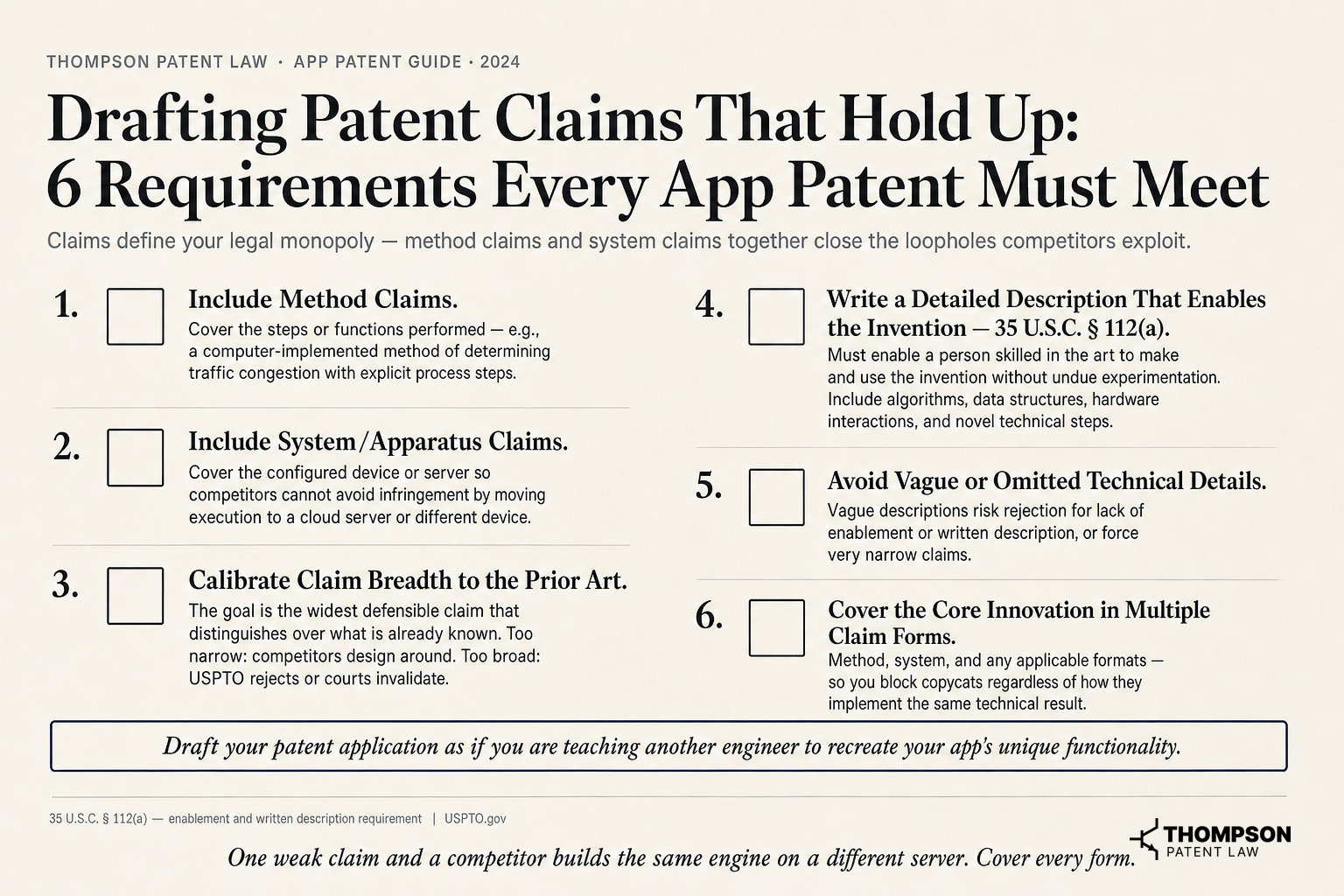 Drafting Patent Claims That Hold Up: 6 Requirements Every App Patent Must Meet, Source: 35 U.S.C. § 112(a), USPTO.gov
Method Claims vs. System Claims for Software
App patents typically use both method claims, covering the steps a processor performs, and system or apparatus claims, covering the configured device or server. These claim types address different technical aspects of the invention to maximize coverage. Method claims are often broader and harder to design around. Filing both closes the workaround routes a competitor might use, such as running your process on a cloud server instead of the phone. A secure communications system for direct transfer between mobile devices illustrates how both claim types work together.
Why Claim Scope Determines Enforceability
Overly narrow claims are easy to design around, and overly broad claims get rejected or invalidated. Experienced patent attorneys calibrate scope by mapping the invention against prior art to find the widest defensible boundary. Thompson Patent Law emphasizes Litigation Quality Patent® services for exactly this reason, drafting detailed claims broad enough to matter and specific enough to survive challenge. Weak claims create a false sense of security, because patent protection is only as valuable as the scope the examiner allows.
The Detailed Description Must Teach the Invention Completely
Under 35 U.S.C. § 112, your specification must enable a skilled engineer to make and use the invention without undue experimentation. For mobile apps, describe data flows, processing steps, and system architecture with enough specificity that nothing is left to guesswork. The subject matter must be disclosed completely so the specification supports every claim. Vague descriptions produce narrow or rejected claims, and weak documentation carries real costs, as the Stanford v. Roche lesson shows.
Filing Your Patent Application with the USPTO Step by Step
Once your search is done and your invention type is clear, here is what filing actually looks like.
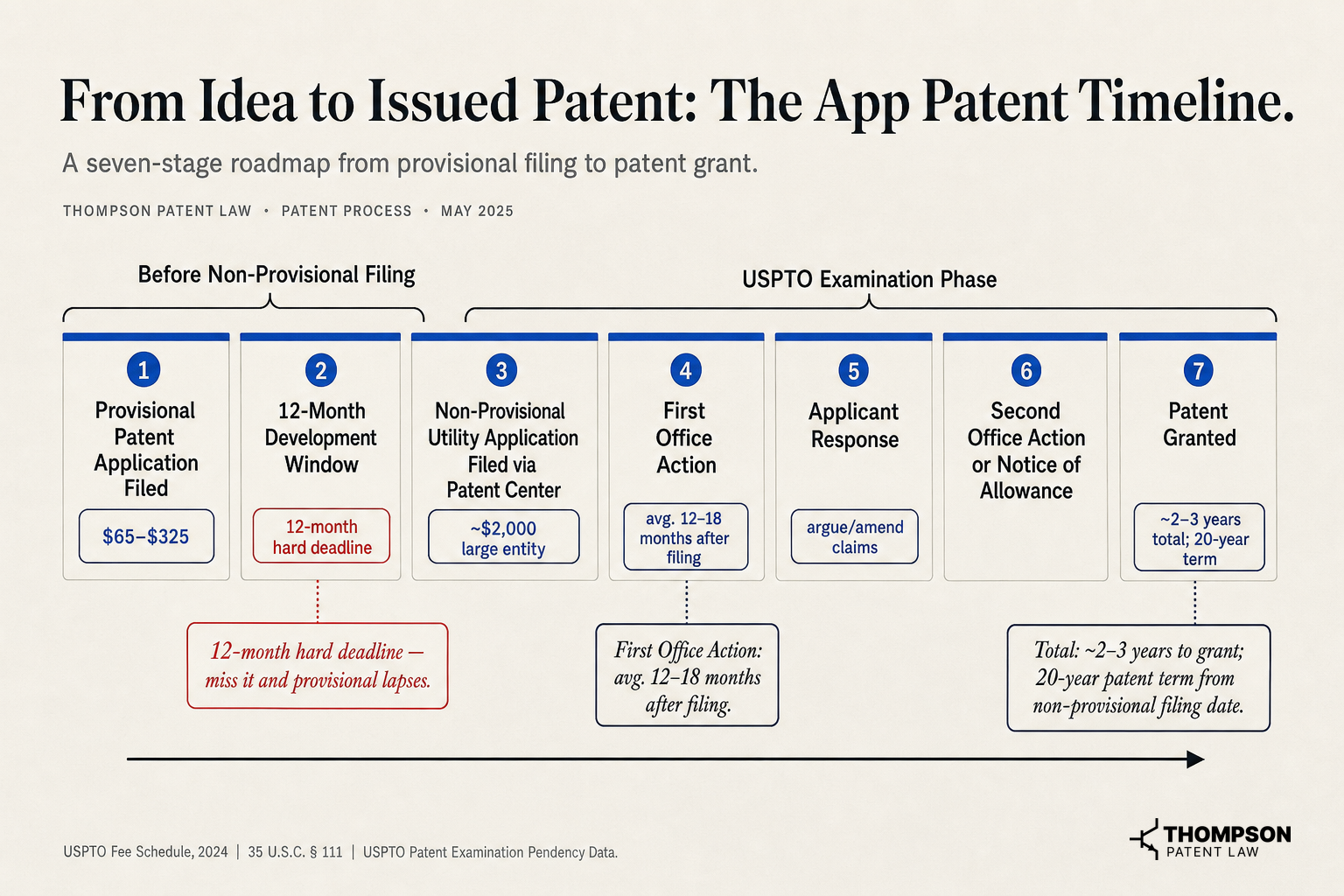 From Idea to Issued Patent, The App Patent Timeline, Source, USPTO Fee Schedule, 2024, 35 U.S.C. § 111, USPTO Patent Examination Outcomes Report
Preparing and Submitting Your Filing Package
The USPTO's Patent Center fully replaced EFS-Web in 2023 as the USPTO electronic filing system. Understanding the steps to patent an app begins with assembling a complete filing package. A complete non-provisional package includes the specification, drawings or diagrams, at least one claim, an abstract, an Application Data Sheet, and the filing fees. If something is missing, the patent office sends a Notice of Missing Parts, which stalls your application until you fix it. Verify your package against the checklist before submitting, and confirm your patent filing date is preserved.
What Happens After You File
The patent office assigns an examiner based on technology classification, and most mobile applications filings land in Technology Center 2100 for computer architecture and software. The first Office Action typically arrives 12 to 18 months after filing and may include rejections under §§ 101, 102, or 103. Rejections are normal. Most patents issue only after one or more rounds of response, which experienced prosecution counsel can shorten.
How to Respond to an Alice Rejection Without Starting Over
A § 101 rejection citing Alice is one of the most common office actions for app patents, because patent examiners scrutinize whether claims are directed to abstract ideas rather than a concrete technical problem. A successful response shows your claims are directed to a specific technical improvement, not an abstract idea on generic hardware. In Enfish, LLC v. Microsoft Corp. (Fed. Cir. 2016), the court held a self-referential database was a specific improvement in computer functionality. Citing that precedent and your unconventional technical solution to the technical problem at hand is the core strategy. Our practical guide to patenting computer software breaks down these responses further.
How Much It Costs to Patent an App and What Drives the Price
Cost is a top question and a real decision factor, so here are concrete numbers.
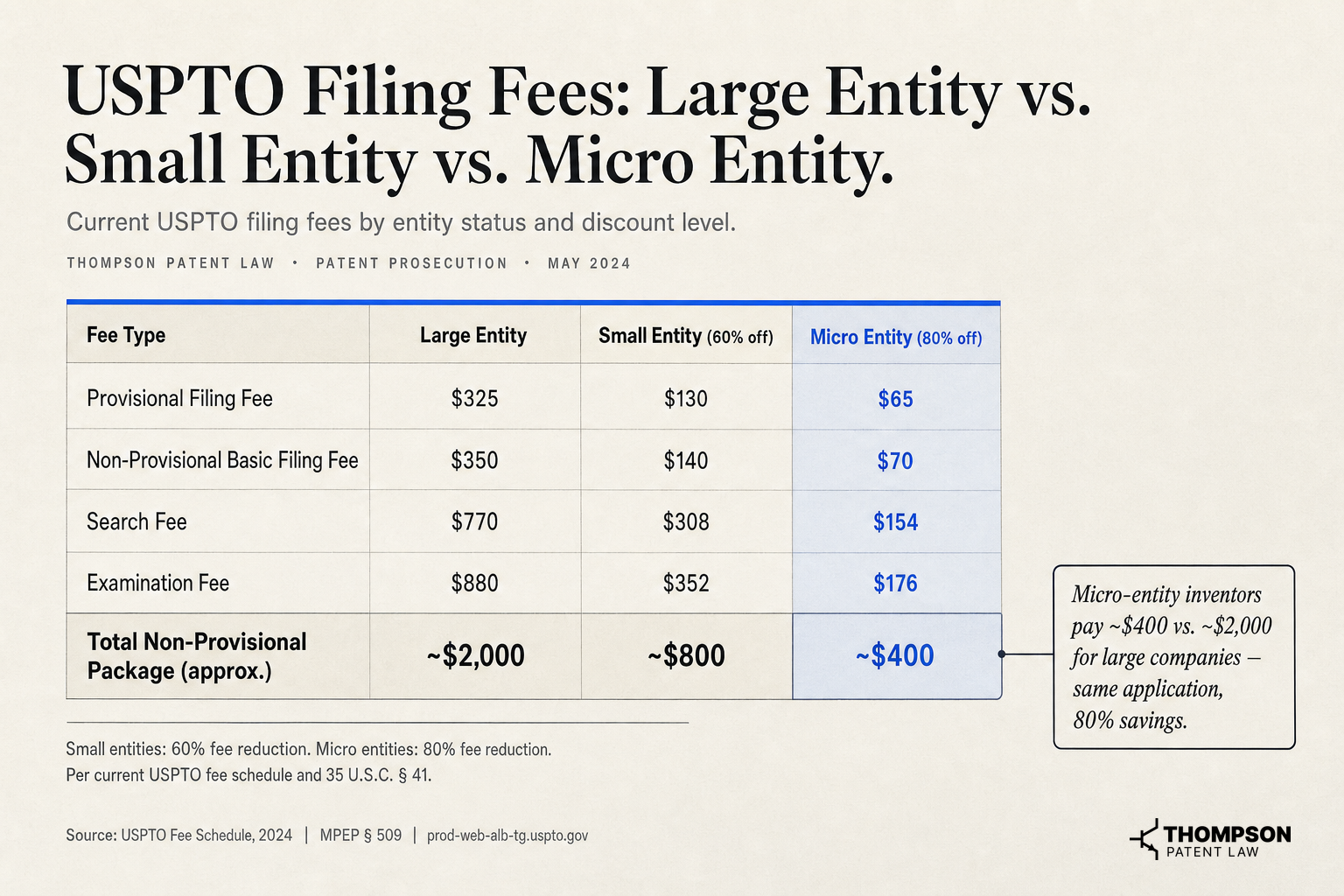 USPTO Filing Fees, Large Entity vs. Small Entity vs. Micro Entity, Source, USPTO Fee Schedule, 2024, MPEP § 509
USPTO Filing Fees Inventors Pay Directly
Small entity applicants, including most independent inventors and businesses under 500 employees, pay a fraction of standard USPTO fees, and micro entity applicants pay even less. Verify your entity status before filing, because the right classification can cut your direct USPTO costs substantially.
Attorney Fees and Why They Vary
Patent attorney fees to draft and file a software patent application typically run $8,000 to $15,000+ depending on complexity, claim count, and experience. The patent application process for software often includes multiple office action rounds that add to total cost. Each office action response adds cost. Attorneys with a track record navigating Alice rejections command higher rates but often spare clients one to two years and five figures in prosecution costs by getting claims right the first time. Treat these fees as an investment, not an expense, and evaluate experience with software patents rather than headline rates, because legal fees are the largest single cost.
Provisional Patent Application as a Lower-Cost Entry Point
A provisional utility patent application carries lower USPTO fees and lower attorney fees because it requires no formal claims. That makes it a strategic entry point for app inventors on limited budgets who need a priority date before a launch or investor pitch. Many provisional patent applications come in well under the full non-provisional cost, but the 12-month conversion deadline is non-negotiable.
Frequently Asked Questions About How to Patent an App
!Provisional vs. Non-Provisional Patent Application: Which Is Right for Your App?
Provisional vs. Non-Provisional Patent Application, Which Is Right for Your App?, Source: 35 U.S.C. § 111 (uscode.house.gov), USPTO Fee Schedule, 2024, blueironip.com
How much does it cost to patent an app?
Total costs typically run $10,000 to $20,000+ for a professionally drafted utility patent application, combining USPTO fees and patent attorney fees. A provisional patent application costs far less and must convert to a non-provisional within 12 months. Verify your small or micro entity status, since the right classification reduces your direct USPTO fees.
Is there a way to patent an app by yourself?
You can file pro se, but the USPTO itself recommends using a registered patent attorney or agent because the process is complex. A poorly drafted application produces claims too narrow to matter or claims examiners reject under § 101 or § 103, and the filing fee is not refundable. For most app inventors, the risk of a weak patent outweighs the savings.
Do people patent apps, and is it worth it?
Yes. The USPTO granted over 348,000 utility patents in 2023, many in software. These u.s. patents span a wide range of technical fields, including mobile app innovations. Whether it is worth it depends on your technical distinctiveness, existing technology landscape, and competitive environment. For apps with a novel technical approach, a patented invention deters cloning, reduces patent litigation risk for the owner, strengthens investor due diligence, and adds leverage in acquisitions.
What is the difference between a patent, copyright, and trademark for an app?
A patent protects the technical method or system your app uses. Copyright automatically protects the source code and visual expression at creation but not functionality. Under copyright law, this protection arises without registration but covers only expression, not the underlying technical method. A trademark protects the app's name and logo as brand identifiers registered with the United States Patent and Trademark Office, which also serves as the trademark office for all federal trademark registrations. These three forms of legal protection are complementary, and most serious app businesses pursue all three.
What to Do Right Now If You Want to Patent Your App
The bottom line is simple. A weak patent files paperwork and protects nothing, while a strong one with carefully calibrated claims actually blocks competitors. App patent rights are time-sensitive, and the one-year clock starts the moment you publicly disclose or sell your product. Many app ideas that could have been protected are lost simply because founders wait too long to file. The most common outcome for inventors who delay is not rejection, it is forfeiture of rights they never knew they had.
Thompson Patent Law drafts software and app patent applications with a focus on claim scope that survives examination, including Alice challenges, through Litigation Quality Patent® services engineered for protection that holds up rather than paperwork that simply files. The firm works with patent offices worldwide, including the United States patent trademark office, to secure rights for clients. The firm is a team of registered patent attorneys with engineering degrees and backgrounds from software development, industry, and major law firms, led by Craige Thompson, a patent attorney, MBA, and electrical engineer, serving clients from individual inventors to Fortune 500 companies. Explore more on the innovation hub.
Schedule a Complimentary Patent Needs Assessment to get a direct evaluation from a member of our team about whether your app qualifies, and what protection strategy fits your timeline and budget. Acting now preserves your rights, protects your market position, and turns your engineering work into a defensible competitive advantage.
Craige Thompson
Patent Attorney, MBA, Electrical Engineer
Thompson Patent Law